Google Search Console: A Beginner's Guide to Improving Your Website's Search Performance
If you own a website, one of the most valuable free tools available is Google Search Console.
Whether you run a business website, an online store, or a blog, Google Search Console helps you understand how your website performs in Google Search and highlights issues that may prevent your pages from appearing in search results.
In this guide, we'll explain what Google Search Console is, why it's important, and how you can use it to improve your website's visibility.
What Is Google Search Console?
Google Search Console (GSC) is a free tool provided by Google that allows website owners to monitor, maintain, and troubleshoot their website's presence in Google Search.
It provides valuable information about:
- How many people find your website through Google.
- Which search terms bring visitors to your site.
- Which pages receive the most clicks.
- Whether Google can crawl and index your pages.
- Technical issues that may affect search rankings.
Unlike Google Analytics, which focuses on visitor behaviour after they arrive on your website, Google Search Console focuses on how users discover your website through Google Search.
Why Is Google Search Console Important?
Search Console helps you make informed decisions based on real search data rather than guesswork.
Some of the biggest benefits include:
- Monitor search performance.
- Find keywords your website already ranks for.
- Identify pages that need SEO improvements.
- Detect indexing and crawling issues.
- Submit new pages to Google.
- Monitor backlinks.
- Improve mobile usability.
- Receive alerts when Google detects problems.
For businesses that rely on online enquiries, Search Console is an essential part of maintaining a healthy website.
Understanding the Performance Report
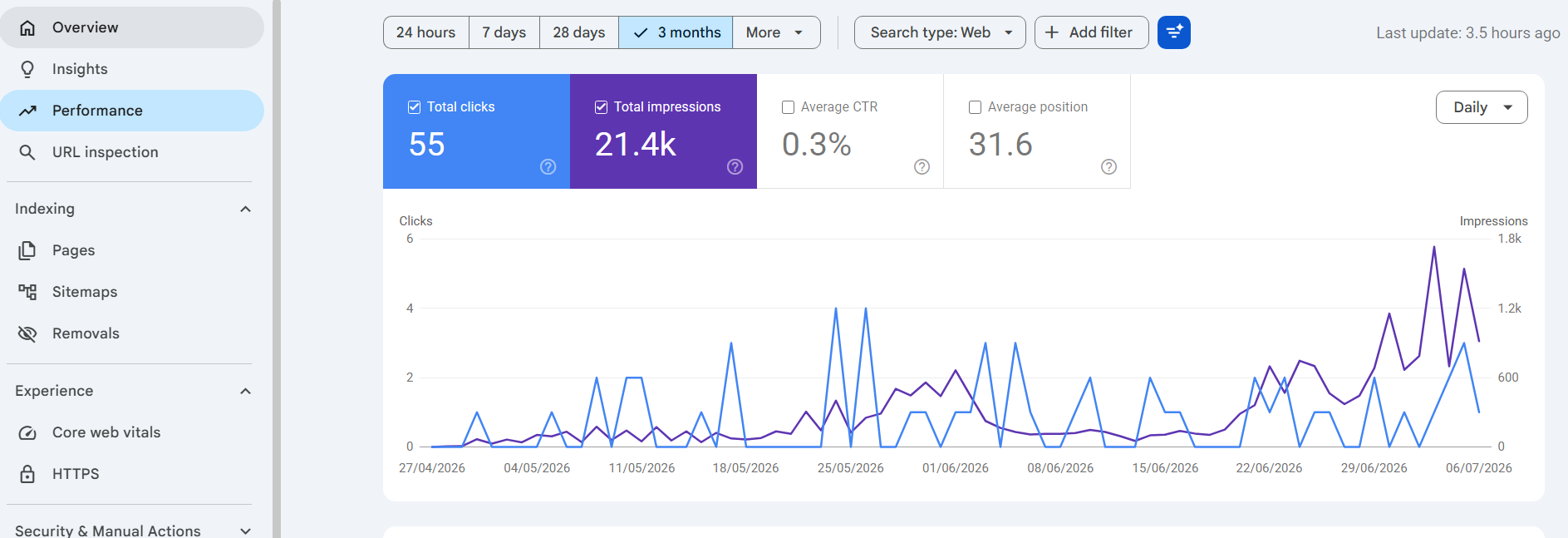
The Performance report is one of the most useful sections inside Google Search Console.
Here you'll find metrics such as:
Total Clicks
The number of users who clicked your website from Google Search.
Total Impressions
How often your pages appeared in Google search results.
Average Click-Through Rate (CTR)
The percentage of users who clicked after seeing your page.
For example:
- 1,000 impressions
- 80 clicks
- CTR = 8%
Improving your page titles and meta descriptions can often increase your CTR.
Average Position
This shows your average ranking in Google Search.
For example:
- Position 3 usually receives significantly more clicks than Position 15.
Monitoring these positions helps you identify opportunities to improve existing pages.
Indexing and Coverage
If Google cannot index your pages, they cannot appear in search results.
The indexing section shows:
- Indexed pages
- Excluded pages
- Pages with errors
- Pages with warnings
Common reasons pages may not be indexed include:
- Noindex tags
- Duplicate content
- Redirects
- Crawl errors
- Pages blocked by robots.txt
Regularly reviewing indexing reports helps ensure Google can access your most important content.
Submit Your Sitemap
A sitemap tells Google which pages exist on your website.
After creating a sitemap, you can submit it through Google Search Console.
Benefits include:
- Faster discovery of new pages.
- Easier crawling.
- Better visibility for recently updated content.
Although Google may still find pages without a sitemap, submitting one gives Google a clearer picture of your website's structure.
URL Inspection Tool
The URL Inspection Tool allows you to inspect individual pages.
You can check whether:
- The page is indexed.
- Google can crawl it.
- Mobile usability issues exist.
- Structured data is valid.
- The page is eligible for rich results.
If you've recently updated a page, you can also request re-indexing directly from this tool.
Core Web Vitals
Website speed and user experience play an important role in SEO.
Google Search Console reports Core Web Vitals based on real user data.
These measurements focus on:
- Loading speed.
- Visual stability.
- Responsiveness.
- Overall page experience.
Improving these metrics can create a better experience for visitors and may support better search performance over time.
Mobile Usability
Since Google primarily uses mobile-first indexing, your website should work well on smartphones and tablets.
Search Console can identify issues such as:
- Text too small to read.
- Clickable elements too close together.
- Content wider than the screen.
- Viewport configuration problems.
Fixing these issues helps create a better experience for mobile visitors.
Links Report
The Links report shows:
- Websites linking to yours.
- Your most linked pages.
- Internal linking structure.
- Anchor text used by other websites.
Backlinks remain an important ranking factor, making this report useful for monitoring your website's authority.
Common Problems Search Console Can Help You Find
Many website owners only discover technical issues after traffic drops.
Google Search Console can alert you to problems such as:
- Pages not indexed.
- Broken pages (404 errors).
- Server errors.
- Redirect issues.
- Security warnings.
- Manual penalties.
- Structured data errors.
- Mobile usability problems.
Addressing these issues early helps keep your website performing at its best.
Tips for Getting the Most from Google Search Console
To make the most of Search Console:
- Check your reports regularly.
- Monitor keyword performance each month.
- Improve pages with high impressions but low click-through rates.
- Fix indexing issues as soon as possible.
- Submit updated pages for re-indexing after significant changes.
- Keep your sitemap up to date.
- Review Core Web Vitals after website updates.
Small improvements made consistently can lead to significant gains in search visibility over time.
Google Search Console is one of the most valuable free SEO tools available. It provides direct insight into how Google views your website and helps you identify opportunities to improve search performance.
Whether you're launching a new website or managing an established business, regularly checking Search Console can help you monitor your site's health, improve visibility, and make informed decisions based on real search data.
If you haven't already connected your website to Google Search Console, it's well worth doing. The insights it provides can help you understand your audience, resolve technical issues, and support long-term growth in organic search.